Apple Thoughts - News & Reviews on all things Apple

Be sure to register in our forums and post your comments - we want to hear from you!


Zune Thoughts

Loading feed...

Windows Phone Thoughts

Loading feed...

Digital Home Thoughts

Loading feed...


All posts tagged "reviews"


Friday, August 27, 2010

So How Do You Like it After 100 Days Dan?

Posted by Jeff Campbell in "Apple iPhone, iPod Touch, iPad" @ 05:00 AM

http://www.businessinsider.com/ipad...y-review-2010-8

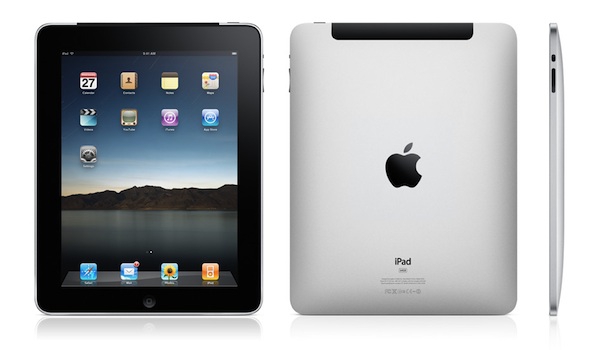
"It has now been 100 days since my iPad 3G arrived. (And exactly four months since I first used an iPad in early April, and posted my thoughts about it.)"

And for the most part, Business Insider's Dan Frommer really likes his iPad. There are some things that annoy him, such as web sites that aren't designed for devices such as the iPad, but it has become his favorite computer. Speaking of annoyances, does it annoy anyone else about the Business Insider site that you have to click through each page? It really annoys me, but the article is worth the read to get his perspective on the iPad in my opinion.


Thursday, August 19, 2010

Griffin Stylus for Touch Screens (aka iPads/iPhone/iPod Touch)

Posted by Jeff Campbell in "Apple iPhone, iPod Touch, iPad" @ 10:00 AM

http://www.ilounge.com/index.php/re...one-ipod-touch/

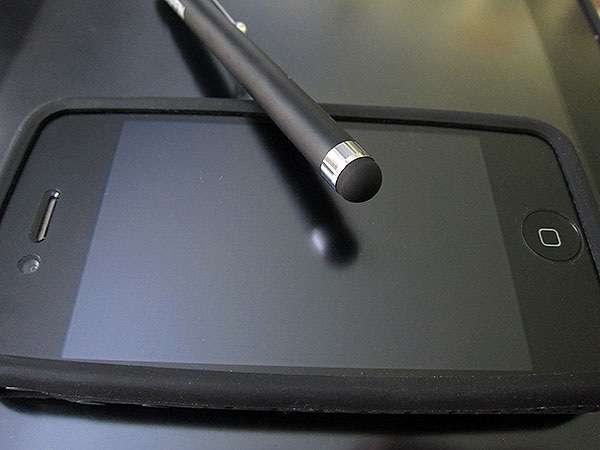
"Originally shown on Griffin's web site as the Stylus for iPad ($20), the package actually reads "Stylus" and now references the "iPad + iPhone + iPod touch," suggesting that this miniature pen-sized tool might appeal to all Apple touchscreen device users."

I might have to give this one a try, as I'm interested in doing more with my iPad such as taking notes, etc. There are several in the iTunes store that allow you to take written notes, such as Ghostwriter Notes [affiliate link] for $2.99 USD, iNotes for iPad [affiliate link] for $3.99 USD, PadNotes [affiliate link] for $0.99 USD or even SketchPad HD [affiliate link] for $0.99 USD that doubles as a sketch pad, complete with color palette. If you want something a little fancier, WritePad for iPad [affiliate link] for $9.99 USD has handwriting recognition as well as DropBox and Wi-Fi syncing capabilities. I'm sure there are many more as well, so the options are out there, and this stylus appears to be just the accessory that will work with them.


iMac is a Fast Machine, or so says Silverman

Posted by Jeff Campbell in "Apple Desktops" @ 06:00 AM

http://www.macdailynews.com/index.p...pc_can_compare/

"Apple's 'entire iMac family was updated with faster processors, bigger hard drives and more powerful graphics cards,' Dwight Silverman reports for The Houston Chronicle."

One impressive quote from Silverman: "As you can imagine by the specifications, this is one fast machine. While Macs have never had a reputation for being gaming systems, this model excels at that. I installed Valve's Steam gaming platform - which just recently began offering Mac support - as well as a native version of Call of Duty: Modern Warfare. The iMac handled them superbly, with the eye candy turned up to 11." That is good to hear, as I've just now started playing around more with Steam. Most of my gaming is done on my Xbox 360 but the Valve system is appealing. But it's not all about gaming either, as you will see when you check out his review.


Thursday, July 22, 2010

We Want You: Thoughts Media Review Team Seeking Contributors

Posted by Jason Dunn in "Thoughts Media Status Updates" @ 03:04 PM

http://www.thoughtsmedia.com/reviewteam.php

Do you enjoy using new hardware, software and accessories, then sharing your experience with others? Then join us on the Thoughts Media Review team! We're looking for individuals who find it fun to test hardware, software, and accessories then give their honest opinions about them.

Our areas of focus include laptops, netbooks, slates, tablets, Windows Phones, the Microsoft Zune, Android phones, the iPhone, iMacs, Macbooks, iPad, and other digital devices such as digital cameras, video cameras, photo editing software, printers, scanners, video editing software...and pretty much anything else related to creating, editing, and sharing anything digital. Oh, and don't forget about headphones and nearly any other gizmo out there from portable batteries to memory cards to power bars. We focus on the Windows and OSX platforms, along with Windows Phone, iOS, and Android for mobile platforms.

If it's technology-related, odds are good that it can be covered on one of our sites - and that means you can write about it. It's important to understand that you won't be writing for a single site - you can review any product you want as long as it fits into one of the areas of focus that our network covers.

We're looking for people with a solid grasp of the English language, but you don't have to be the next John Grisham to qualify. Impressive writing skills are less important than having an appetite for thoroughly testing technology and sharing your thoughts with others. Part of the review team application process is writing a trial article, and we'll get a good feel for your writing ability from that.

Interested? We have more information on this page, including a FAQ that's worth looking at. I'm looking to add at least a dozen new faces to the review team, so if you're interested, please apply! I'm also happy to answer any questions you might have that aren't covered in the FAQ, so please post them here and I'll respond.


Wednesday, June 23, 2010

iPhone 4 Reviews? Yes, There Are a Few Out There

Posted by Jeff Campbell in "Apple iPhone, iPod Touch, iPad" @ 06:38 AM

http://osxdaily.com/2010/06/22/ipho...ly+(OS+X+Daily)

"iPhone 4 reviews are out, and you probably won't be surprised to hear they're overwhelming positive."

And there is no shortage of sites that you can visit to find a review of the device most of us have to wait until tomorrow to have in hand. Here are six of them though...

The Engadget review is very thorough, with comparison photos of the 3GS screen versus the iPhone 4 screen as well as several videos filmed with the iPhone 4. With those shots you can really tell the difference with the new screen. But what was pretty amazing to me was the battery life, or at least what they got out of their review unit from typical daily use: 38 hours! BoingBoing had similar results. My 3GS is done with typical use after about 8 or so hours so I'm looking forward to this improvement. What are your thoughts? What is most appealing about the iPhone 4 for you?


Friday, May 21, 2010

Rotten Tomatoes Reviews Added to iTunes

Posted by Jeff Campbell in "Apple Software (OS X)" @ 06:00 AM

http://www.cultofmac.com/itunes-add...w+(Cult+of+Mac)

"User ratings on iTunes alone can be misleading when you're trying to decide which movie to buy or rent. A perfectly execrable movie might have a four or five star rating thanks to the efforts of a small pool of fans to bump its rating up."

I find this type of review much more helpful than the normal ratings they have in iTunes, now all they need to do is spread this type of review to other areas in iTunes. It never hurts to have a wider range of opinions when it comes to putting out a few bucks for a product you haven't seen or heard.


Tuesday, May 4, 2010

My Month With The iPad

Posted by Jeff Campbell in "Apple iPhone, iPod Touch, iPad" @ 06:00 AM

Product Category: Tablet Computer
Manufacturer: Apple
Where to Buy: Apple, Amazon.com, Best Buy
Price: Wi-Fi Version 16GB $499.00 USD, 32GB $599.00 USD, 64GB $699.00 USD; 3G Version 16GB $629.00 USD, 32GB $729.00 USD, 64GB 829.00 USD
Specifications: Apple Technical Specifications

Pros:

  • Truly portable computing for browsing and media;
  • Compatible with major eBook apps as well as ePub standard;
  • Magazines in all their full color glory;
  • Yes you can use it for work, however there are limits;
  • Nice start to the accessories list.

Cons:

  • No Flash but that may not be a con later;
  • Not all sites are optimized for video;
  • Backlighting may not be optimum for book reading for some;
  • No print option without third-party solutions.

Summary: With the introduction of the 3G version this last Friday, those that have waited to purchase one may have joined the iPad owners club over the weekend. So in light of that even, and the fact it's been one month since I purchased the Wi-Fi version, I thought it was appropriate to give you a run down of what I think about the iPad. The nuts and bolts, or technical side of the iPad has been covered extensively (if you are interested, click on the link above under "specifications" and you will learn all you need to know about the inner workings of the iPad), so this review is more from a user point of view. Its is about my experiences in using the iPad over the last few weeks and what I think of it. I'm also assuming in this that you are familiar with the intuitive way of the iPhone and how it operates, as the iPad is very similar in function. So, lets get to the iPad! Read more...


Thursday, April 1, 2010

Readdle Docs, Document and File Management for the iPhone

Posted by Jeff Campbell in "Apple Software (iPhone/iPod Touch)" @ 01:00 PM

Product Category: Business App
Manufacturer: Readdle
Where to Buy: iTunes
Price: $4.99 USD
System Requirements: iPhone or iPod Touch, OS 3.0 or later

Pros:

  • Broad range of online storage compatibility;
  • Compatible with numerous file types;
  • File manipulation (rename, edit, move, etc) is very easy.

Cons:

  • Not as intuitive as it could be, to get most out of this you really need to read documentation.

Summary: Readdle is a company that makes a variety of products, such as games, a book reader and business & productivity programs such as the portable scanner that we reviewed right here on Apple Thoughts not long ago (and has also been listed at Apple as a staff favorite in the App Store). Now you can also get a document reader and file management system to work with all of those scanned documents.

Read more...


Tuesday, March 30, 2010

Daniusoft Media Converter Ultimate Review

Posted by Chris Sacksteder in "Digital Home Software" @ 07:00 AM

Figure 0

Product Category: Media Conversion Utility
Manufacturer: Daniusoft
Where to Buy: Daniusoft
Price: $59.95
System Requirements: Windows XP, Vista, or 7 (32- or 64-bit)
Specifications: Takes about 73MB of disk space

Pros:

  • Does many different media chores;
  • Easy to use;
  • Supports many media types.

Cons:

  • Sometimes options and choices aren't clear;
  • Technical support is prompt and courteous, but ineffective;
  • Documentation is incomplete for some functions.

Summary: So, you have a pile of great home video clips from that new digital camera. Wouldn't it be great to put some scenes of cute little junior on your cell phone to show off to friends, or on a DVD to send to Grandma? Or maybe The Kid has some favorite DVDs to watch in the car on a nice little netbook without a optical drive. Search the Internet and you find 100's of choices for "free" video conversion tools; a few hours or days later you've tried 10 or 12 kinds cripple-ware, ad-ware, and nag-ware , rebooted 18 times to install and un-install them, and had 3 crash your computer. And, none of them are really free OR do what you need. Time to get serious.

The Daniusoft Media Converter Ultimate claims to be a "multimedia processing Titan" that can " . . . remove DRM copy protection . . . , Rip DVD to most popular video files, Convert Video Music between different files, burn movie to DVD disc, directly transfer songs & video to your portable players like iPod, iPhone, PSP, Cell Phone, etc . . ." Is this Titan worth $59.95?

Read more...


Friday, January 15, 2010

Scanner Pro for the iPhone, a Review

Posted by Jeff Campbell in "Apple Software (iPhone/iPod Touch)" @ 10:00 AM

http://readdle.com/

The Claim: "Scanner Pro transforms iPhone into portable scanner in your pocket. It lets you scan multipage documents, send them by email and even upload to MobileMe iDisk or any other WebDAV enabled server. You can also transfer scanned document to desktop computer over Wi-Fi and transform it into editable MS Word file with OCR tool of your choice. Scanner Pro easily handles situations when you have printed document that should be send by email and there is no scanner nearby. The application incorporates special algorithms that enhance image quality to make it as readable as possible."

The App: Readdle has come out with an application that they claim turns your iPhone into a portable scanner. But can it really compare to a scanner in quality? We shall see!

Read more...


Friday, December 18, 2009

XO Skins For All of Your Coverage Needs

Posted by Jeff Campbell in "Apple iPhone & iPod Touch" @ 12:30 PM

Figure 1: First impressions? Nice packaging!

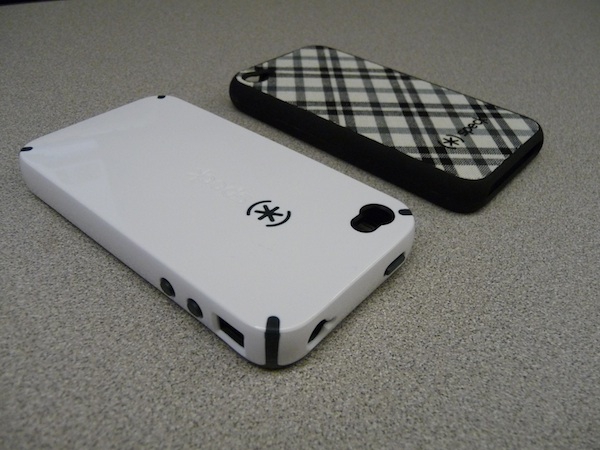
I've used several protective covers for my various iPhones since my first one back in 2007, so I'd say I have quite a bit of experience with them. Last week I was sent one to try out on my iPhone 3GS from XO Skins and I was pleasantly surprised by a few things. Just what exactly you may ask? Read on!.

Read more...


Thursday, July 16, 2009

Aspects 1.0: Aspect Ratio Calc for iPhone / iPod Touch

Posted by Vincent Ferrari in "Apple Software (iPhone/iPod Touch)" @ 05:03 AM

http://www.codesparq.com/aspects/

The Claim: Just like the iPhone itself, Aspects encompasses beauty and ease of use. The clean and simple user interface makes aspect ratio calculations an absolute joy. Aspects doesn't just stop at pixels. It supports widths and heights in inches and centimeters, and resolutions in pixels per inch and pixels per centimeter, making it possible to calculate both screen-based and paper-based image sizes. Simply modify one value and Aspects takes care of the rest. Ratios Galore From standard 4:3 to wide 16:9 to old school 1.75:1, Aspects lets you select from twenty-three predefined ratios. And you can create your own, too!

The Application: Condensed into a two-screen UI, can Aspects really make the tedious chore of adjusting aspect ratios for your blog posts / multimedia projects "an absolute joy?" You're gonna have to read on to find out!

Read more...


Friday, February 27, 2009

Older App Reviews By Non-Owners Erased

Posted by Vincent Ferrari in "Apple iPhone & iPod Touch" @ 11:00 AM

http://cultofmac.com/non-customer-r...-app-store/8966

"When the app store launched in 2008, you could review the app even if you didn't buy it. As a result there were a lot of static reviews, both good and bad, as companies tried to push their products or topple competitors. In September, Apple announced a ban on non-customer reviews from the apps, but the old reviews were still visible."

This is a great day for developers whose apps were unfairly panned by people who had never bother trying them. The situation at the App Store was really bad. It reminded me of the situation on Amazon with Spore where people who didn't even buy the game were slamming it with negative reviews just because of the DRM and had never even played the game. It's not fair to developers, and this ought to further ingratiate Apple with a group of people they need and who, for the most part recently, haven't been too happy with them.


Featured Product
News Tip or Feedback?

Contact us

Other Apple Resources

iPhone Life

Thoughts Media Sites

Windows Phone Thoughts

Digital Home Thoughts

Zune Thoughts

Apple Thoughts

Android Thoughts

4Smartphone
Reviews & Articles

Loading feed...

News

Loading feed...

Reviews & Articles

Loading feed...

News

Loading feed...

Reviews & Articles

Loading feed...

News

Loading feed...

Reviews & Articles

Loading feed...

News

Loading feed...

Reviews & Articles

Loading feed...

News

Loading feed...

Sponsored links